
From Prompts to Programs to Agents, Part 4
In the last post, we looked at how AI reshaped teamwork. I discussed how humans stayed in the loop while friction melted away. Now, it’s time to reimagine the Reporter itself.
Let’s start with its purpose. The report was never for reporting’s sake—it’s meant to drive action. People need to share it, review it, prune or expand recommendations, maybe even track and execute actions directly from it. That simple workflow carries a lot of potential.
For now, though, I’ll keep things simple to show what happens when we give the Reporter more power, more agency, without losing control.
From Human Workflow to Agentic Workflow
Before we automate, let’s think about the regular, human-first flow.
Imagine you have a person responsible for analyzing cluster metrics and building a report. That person has access to the CockroachDB Cluster API and a web application where reports can be created, reviewed, and edited.
I’ve built a small demonstration app to show this process:
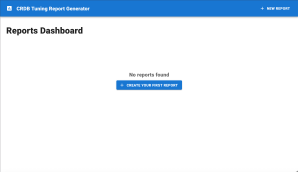
The analyst uses the Cluster API to gather metrics, then creates findings in the web application.
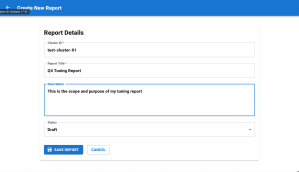
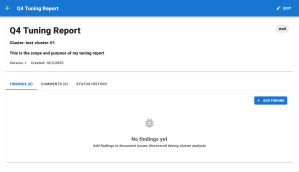
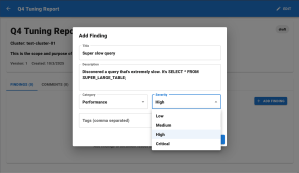
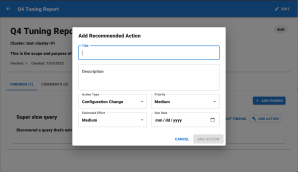
The web app is backed by a Python FastAPI service exposing these endpoints:
GET     /api/v1/reports                    → List Reports
POST    /api/v1/reports                    → Create New Report
GET     /api/v1/reports/{report_id}        → Get Report
PUT     /api/v1/reports/{report_id}        → Update Existing Report
DELETE  /api/v1/reports/{report_id}        → Delete Existing Report

GET     /api/v1/reports/{report_id}/findings       → List Findings
POST    /api/v1/reports/{report_id}/findings       → Create Finding
PUT     /api/v1/findings/{finding_id}              → Update Finding
DELETE  /api/v1/findings/{finding_id}              → Delete Finding

GET     /api/v1/findings/{finding_id}/actions      → List Actions
POST    /api/v1/findings/{finding_id}/actions      → Create Action
PUT     /api/v1/actions/{action_id}                → Update Action

GET     /api/v1/reports/{report_id}/comments       → List Comments
POST    /api/v1/reports/{report_id}/comments       → Create Comment
This allows me to build a structured report.
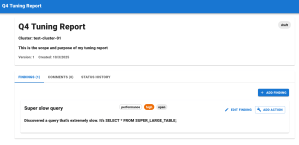
So what if I want the LLM itself to act as the reporter?
I can create an agent and give it the same API access as the human—just through tools.
Building the Agent
Let’s start with a minimal setup using the FastAgent library.
import asyncio
from mcp_agent.core.fastagent import FastAgent

# Create the application
reporter = FastAgent("Report Generator")

# Define the agent
@reporter.agent(instruction="""You are an expert at database performance analysis and optimization""")
async def main():
    # use the --model command line switch or agent arguments to change model
    async with reporter.run() as agent:
        await agent.interactive()

if __name__ == "__main__":
    asyncio.run(main())
At this stage, it’s in interactive() mode so I can test before weaving it into the full app.
I also need two files:
fastagent.config.yaml– defines default model, logging, and MCP serversfastagent.secrets.yaml– securely stores model API keys and environment variables
Example Configuration
# fastagent.config.yaml
default_model: sonnet35

logger:
  level: "debug"
  type: "console"
  progress_display: true
  show_chat: true
  show_tools: true
  truncate_tools: true
# fastagent.secrets.yaml
openai:
  api_key: <your-openai-key>
anthropic:
  api_key: <your-anthropic-key>
If I start it in interactive mode, I get a chat interface like this:
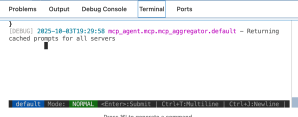
Feeding it the same prompt as before produces a similar structured report—almost.
Previously, the structure was enforced by a tool call:
const tools = [
  {
    type: "function",
    function: {
      name: "generateRecommendations",
      description: "Generates structured recommendations for a CockroachDB cluster",
      strict: true,
      parameters: { /* JSON schema */ }
    }
  }
];
Stuffing the JSON schema into the agent prompt is brittle because some models still prefix their response (“Here is your JSON response:”) and break the UI contract.
So now we’ll empower the agent with real tools using Model Context Protocol (MCP).
Empowering the Agent with MCP
MCP (Model Context Protocol) is an open-source standard that connects an LLM to internal or external systems.
In this case, I want the agent to access the Reporter Service API to create reports the same way a human would.
If APIs connect UIs to services, think of MCP as connecting agents to tools.
An MCP server sits between the agent and those systems, exposing structured functions it can call.
Let’s define one using FastMCP:
from fastmcp import FastMCP

mcp = FastMCP("Example Server")

@mcp.tool
def temp_to_celsius(f: float) -> float:
    """Convert a temperature from Fahrenheit to Celsius"""
    return round((f - 32) * 5.0 / 9.0, 2)

if __name__ == "__main__":
    mcp.run()
Each @mcp.tool makes a function callable by an agent.
For our app, instead of writing every endpoint by hand, FastMCP 2.0 introduces a shortcut that can wrap a full FastAPI app into an MCP server:
from main import app
from fastmcp import FastMCP

# Convert to MCP server
mcp = FastMCP.from_fastapi(app=app)

if __name__ == "__main__":
    mcp.run()
Now every endpoint in the Reporter API becomes a callable tool.
Next, register the server in the FastAgent configuration:
# fastagent.config.yaml
mcp:
  servers:
    reporter:
      command: "python"
      args: ["reporter_mcp.py"]
And add necessary environment variables:
# fastagent.secrets.yaml
mcp:
  servers:
    reporter:
      env:
        DATABASE_URL: "cockroachdb+psycopg://root@insecure-database:26257/tuning_reports?sslmode=disable"
Finally, wire it into the agent definition:
@reporter.agent(
  instruction="You are an expert at database performance analysis and optimization.",
  servers=["reporter"]
)
Now, when I prompt:
“Use the reporting tools to create a fictional crdb tuning report.”
the agent does exactly that—creating structured records via the MCP tools.
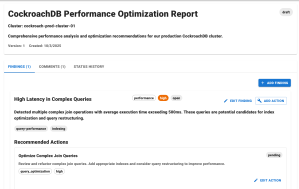
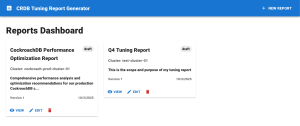
It even added comments automatically! That’s the power of giving an agent access to well-documented tools.
Wiring It All Together
There’s one last piece: context. The agent still needs cluster metrics. We can expose CockroachDB Cluster API endpoints through the same FastAPI app and include credentials in the secrets config.
Then we create an API endpoint that generates reports using the agent.
The Agent Service (snippet)
 async def generate_report_with_agent(database: str, app: str, custom_prompt: Optional[str] = None) -> str:
    reporter = FastAgent("Report Generator")
    prompt = custom_prompt or f"""
Please analyze the CockroachDB cluster performance for the '{database}' database and '{app}' application...
"""
    @reporter.agent(
        instruction="You are an expert at database performance analysis and optimization.",
        servers=["reporter"]
    )
    async def generate():
        async with reporter.run() as agent:
            return await agent.send(prompt)
    return await generate()
The API Endpoint
@app.post("/generate-report", response_model=GenerateReportResponse)
async def generate_report(request: GenerateReportRequest):
    try:
        report = await generate_report_with_agent(
            database=request.database,
            app=request.app,
            custom_prompt=request.prompt
        )
        return GenerateReportResponse(success=True, report=report)
    except Exception as e:
        raise HTTPException(status_code=500, detail=f"Failed to generate report: {e}")
This lives in a separate agent_main.py, isolated from the core Reporter APIs.
To test, I start a CRDB cluster and load it with test data for my “bookly” database and app:
curl -X POST "http://localhost:8002/generate-report" -H "Content-Type: application/json" -d '{"database": "bookly", "app": "bookly"}'
Refreshing the app shows the new report instantly—no UI changes required!
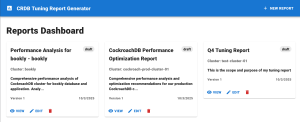
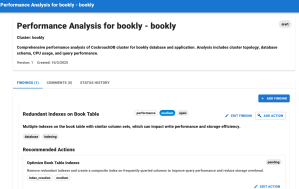
A UI button could easily call this same endpoint to create either a standard or a custom-prompted report.
The Pattern Holds: Direct Value Coupling
What I love most is that the original pattern of direct value coupling still holds. Every model improvement or new MCP tool instantly enriches the agent’s output without code rewrites.
In the beginning, I had to stuff all context into a single prompt. Now, the agent fetches its own data, calls structured APIs, and builds a shareable, actionable report. The reporter didn’t just get smarter, it gained agency. And the human in the loop kept theirs: reviewing, editing, and managing the AI-generated report assets with intention.
What emerged was a structured architecture that supported both the machine acting with autonomy, and the human maintaining authorship. This is our triad working together again: application code orchestrates structure, the AI agent performs the analysis, and the human refines the outcome. Each doing their best part, in concert.
Although this is the last part in the original From Prompts to Programs to Agents journey, I’ll continue exploring what agentic architecture really means — how agents, tools, and humans can work together as an adaptive system.
I’m all about building AI that works with humans, not just for humans or in place of them. I’ll share more code and technical reflections in future posts.